
Overview
How to Sign Up on Anchor
To sign up for Anchor, follow these simple steps:
- Go to the Anchor website https://getanchor.co/ and click on the Contact Sales button.
- Fill out the short form with your details.
Once you have filled the form, our team would contact you to understand your specific business requirements and extend Anchor sandbox invite to you to complete your sign-up.
How to Sign In to Anchor
To log into your Anchor Dashboard, follow these steps:
- Go to the Anchor Dashboard login page at app.getanchor.co
- Enter the email address you used during sign‑up and password, and click “Sign in”. A one-time-password (OTP) will be sent to your email address.
- Enter the OTP sent to your registered email and click “Sign in”.
After signing in, you’ll be directed to the Anchor dashboard, where you can view your deposit accounts, transactions, and other activity for your organisation.
If you forget your password, use the “Forgot password?” link on the login page to reset it via email.
Funding your Account/Wallet on Anchor
To fund your account in the production environment, follow these steps:
- Log in to your Anchor Dashboard.
- Navigate to: Accounts → Deposit Accounts and click on the deposit account you wish to fund.
- Click on the “Account Numbers” tab. You’ll see: Account number, Bank name, Other banking details needed to transfer funds
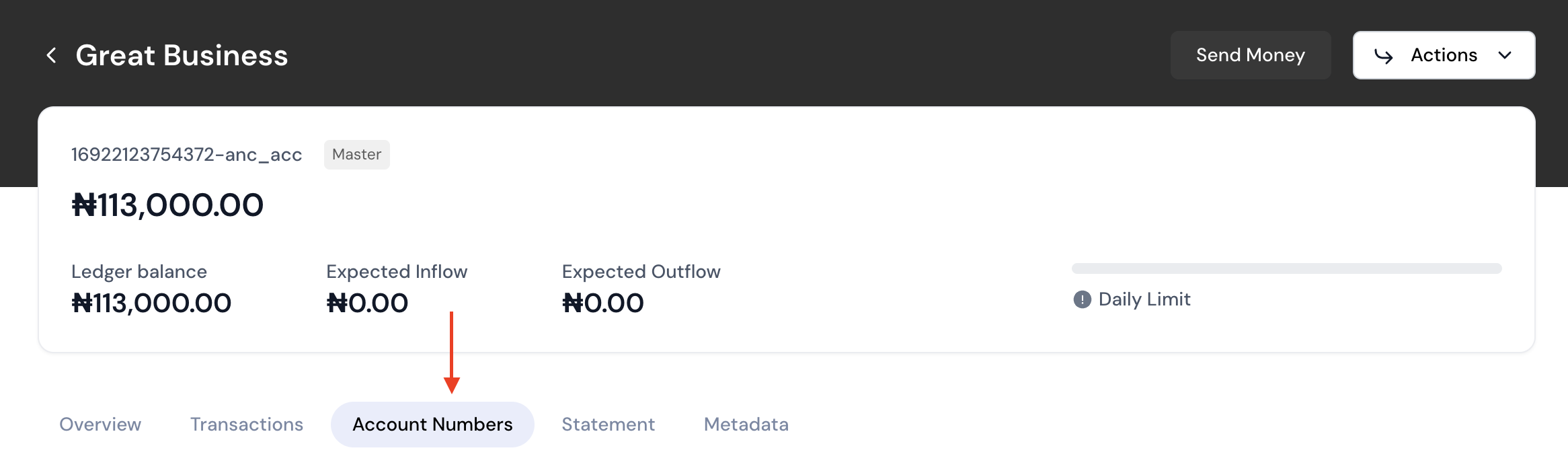
Transfer money from your bank app to the provided account details.
Once you have the account number and bank details, you can transfer directly to fund your production account. The transferred amount will reflect in the account balance in a few moments.
To get Test Funds in Sandbox
You can simulate incoming payment to get test funds in sandbox mode. Below are the steps to fund an account in sandbox
- Login to Anchor Dashboard, go to the Accounts page, select Deposit Accounts then click on Simulate Transfer button.
- Fill the form by filling out your API Keys, Source Account Name and Source Account Number, and select the Virtual Account Number (Virtual Nuban) you want to fund.
(Note that the Source Account Name and Source Account Number can be random values). - On submission, the test fund will reflect in the deposit account linked to the Virtual Nuban.
Updated 8 months ago